
Windows 7 Hocus Pocus Disappearing Act Solved: Show Desktop Shortcuts
Jul 21, 2010I have always loved my laptop, but hated the OS.
So I recently upgraded my laptop from Windows Vista Business to Windows 7 on recommendation from...everyone. That's right, just about anybody who used to use Vista before has said to do the switch pronto . . .
Windows 7 supposedly has more stability and speed than Vista. The techie mags and blogs seemed to agree, so I made the jump. . .
But now, as I get to know the new OS platform, I'm trying to figure out how to do all the tasks I routinely performed on a daily basis pre-Windows 7. Most of it has been ok -- whenever you upgrade, it takes a little time getting used to the new look and feel. Upgrades are supposed to bring improvements and changes, right?
But there's a couple of seemingly small things that have changed or plainly disappeared *POOF!* which make big differences in my daily workflow. It is frustrating because you sit there wondering where did they go?

Using the SHOW DESKTOP icon which was previously conveniently placed in my taskbar at the bottom of the screen was one of them. But guess what?! There's no more icon/shortcut available in Windows 7 that's available in the task bar! :(
Personally, because I need to get back to the desktop so often, this creates a big hole in my Windows 7 experience. Luckily, there's two specific ways to do the same function without much hassle or headache. Here's two ways to SHOW DESKTOP in Windows 7:
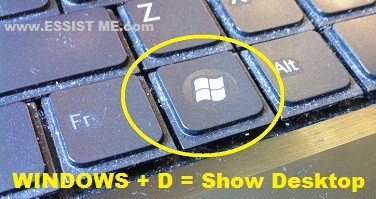
The first way is a keyboard shortcut. Simply use the "WINDOWS + D" combination (like my dusty keyboard? ha!):
The second way is a magic button that Microsoft has placed on the taskbar already (but have not let you know about it):
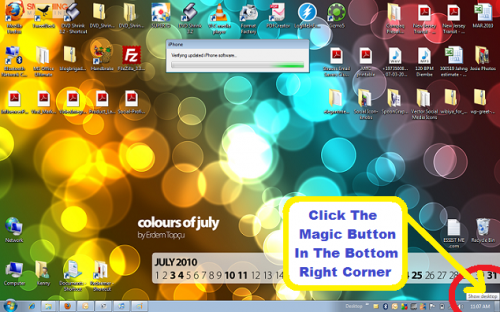
You'll see a non-descript rectangle in the bottom right corner of the screen on the task bar. All the way to the right of the icon tray. If you hover your mouse over it, you'll see the tool tip pop-up for the "Show Desktop" -- click the button and voila!
Hope these tips help!
QUESTION: What other easter eggs or hidden tool tips do you know about in Windows 7?