
How To Cancel Vonage Phone Service
Jan 26, 2011Over the years, I've had various Vonage Voice Over IP (VoIP) telephone lines for different business ventures. I've ported numbers from landlines to the Vonage account. Vonage service has been a good alternative to the phone company.
However, now, it is time to let them go. Other alternatives like Phone.com do the same thing for less and even offer neat features like iPhone apps where I can make and receive calls right on my iPhone 4.
So today, I went to Vonage.com and tried to disconnect my service. Lo and behold! You can't do it online -- you have to call into their customer service department and speak with a live agent to cancel the service. Of course, you know why, right? Because they want to pass you along to their "retention department" and pitch you on staying a customer longer.
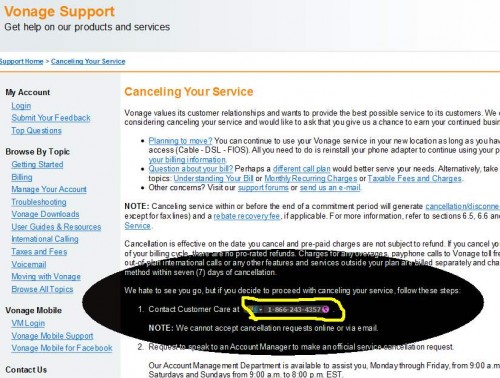
The specific number to call in order to cancel service is buried within their FAQ's.
Here's the Vonage Cancel Service Telephone Number: +1-866-243-4357
Be warned though that there are certain terms where you might be charged a disconnection fee. How crazy is that? That's like a gym membership termination fee. You have to PAY to stop doing business with them.
This specific line was with Vonage for over 6 years. They hate to see me go, and offered me an extra 1 month's free service to think it over.
When you do a quick comparison, it's a very easy decision. Check out this chart comparing Phone.com, Vonage, Time Warner, and Cablevision VoiP telephone services . . .
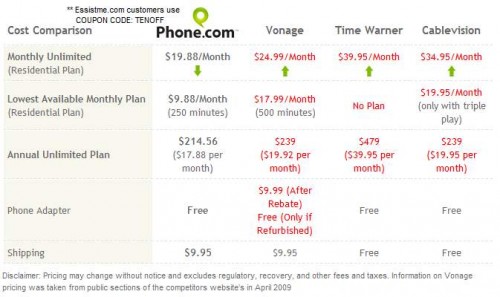
I'm heading over to Phone.com where I can get more features than Vonage for 10 bucks a month.
ESSISTME.COM READERS: Use coupon code "tenoff" for 10% off Phone.com services
QUESTION: WHAT TELEPHONE SERVICE ARE YOU USING? Would you share your experience with a comment below? Thanks!