Build an AI Chief of Staff for Your Ministry Office With Notion and Claude
Sep 28, 2026AI for nonprofit leaders gets a lot more useful once it knows your ministry.
Think about how you use AI right now. You open a new chat and explain your ministry again. You tell it who's on your team, what's urgent this month, and how you like things written.
Then the chat ends, and it forgets all of it.
So I built myself a chief of staff, and I named him Yoda. He runs on Claude, and everything he knows about me lives in a small set of Notion pages. At the start of every session, he reads those pages first. Today most of my AI work goes through him.
He isn't finished. I'm still filling in the page about how I make decisions. But he already knows my priorities, my people, and how I write, so I don't have to repeat myself.
My partner Michael Lukaszewski and I at Stackhouse Ventures have been teaching this approach to our AI Collective members and our consulting clients. You can start building your own this week.
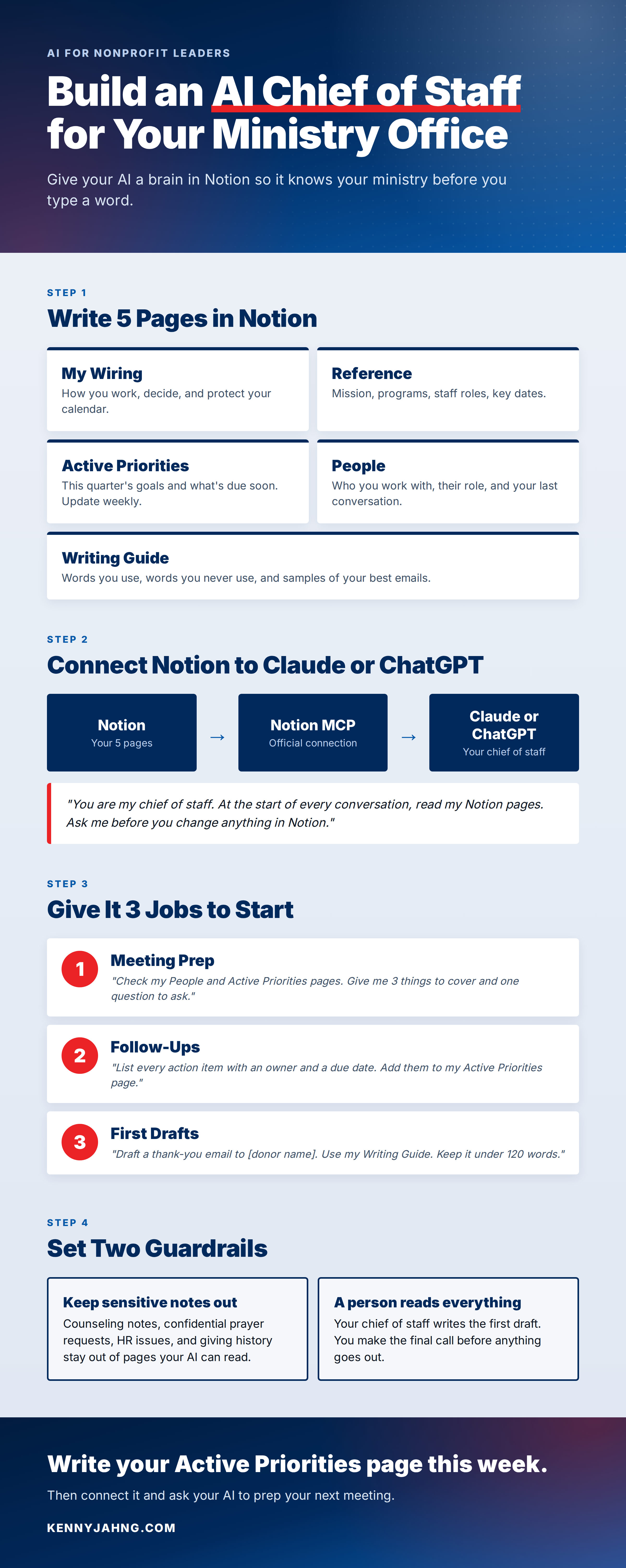
Step 1: Give Your Chief of Staff a Brain in Notion
Start with 5 Notion pages. Keep each one short, and add to them over time.
1. My Wiring
How you work. Your strengths, your blind spots, how you make decisions, and what you protect on your calendar.
2. Reference
The facts about your ministry. Your mission statement, programs, staff roles, key dates, and the names you always use for things.
3. Active Priorities
What matters this quarter. Your top goals, open projects, and what's due soon. Update this page every week.
4. People
The people you work with most. Their role, what they care about, and what you last talked about.
5. Writing Guide
How you sound. Words you use, words you never use, and a few samples of your best emails.
Write these pages the way you'd brief a new assistant on their first day. Plain language works best.
You don't have to write them from a blank page. Let your AI interview you and draft them for you. This is a starter version of the interview prompt we use in our Second Brain Day workshop:
"I'm setting up a second brain in Notion so you can work as my chief of staff. Interview me one section at a time about how I work, my ministry, my current priorities, the people I work with most, and how I like things written. Wait for my answer before you move on. If an answer is vague, ask one short follow-up. When we're done, draft these 5 pages: My Wiring, Reference, Active Priorities, People, and Writing Guide. Don't invent anything. Mark missing details as [to be filled]."
Set aside an hour for it. Then read every page and fix anything it got wrong.
Step 2: Connect Notion to Claude or ChatGPT
Notion has an official connection called Notion MCP. It lets AI tools like Claude and ChatGPT read your Notion pages and write to them. You turn it on inside your AI app, sign in to Notion, and choose which pages it can see.
Plans change often, so check that your Claude or ChatGPT plan includes connectors before you start.
Next, give your chief of staff standing instructions. Both Claude and ChatGPT let you save instructions inside a project, so you don't have to paste them into every chat. Start with something like this:
"You are my chief of staff. Before you answer anything, read my Notion pages: My Wiring, Reference, Active Priorities, People, and Writing Guide. Use what's there so I don't have to repeat myself. If you need something that isn't in my pages, ask me, then offer to add it. Write in the voice described in my Writing Guide. Never change a Notion page without my OK."
That last line is important. Your chief of staff can read everything, and it only changes a page after you say yes.
Step 3: Give It 3 Jobs to Start
Don't hand it everything on day one. Pick 3 jobs that come back every week, and get those working well.
1. Meeting Prep
Before a meeting, ask it to pull what it knows about the person and the topic.
"I meet with [name] tomorrow about [topic]. Check my People page for what you know about them and my Active Priorities page for what I need from this meeting. Give me a short brief: 3 things to cover, one question to ask, and anything I promised them last time."
2. Follow-Ups
At the end of the day, paste in your notes and let it sort out who owes what.
"Here are my notes from today. Pull out every action item with an owner and a due date. Flag anything I promised someone. Then show me the changes you'd make to my Active Priorities page, and wait for my OK before you update it."
3. First Drafts
When you need to write something you write often, let it start the draft.
"Draft a thank-you email to [donor name] for their gift to [program]. Read my Writing Guide first. Keep it under 120 words, name one specific thing their gift made possible, and leave a [PERSONAL NOTE] spot for me to add something only I would know."
Every draft still needs you. Rewrite it so it sounds like you, and add the details only you would know.
Step 4: Set Guardrails Before You Grow It
A chief of staff with access to your notes needs clear rules. Start with two.
Keep sensitive information out. Counseling notes, prayer requests shared in confidence, HR issues, and giving history don't belong in pages your AI can read. Check your ministry's data policy before you add anything about real people.
A person reads everything before it goes out. Your chief of staff writes the first draft, and you make the final call. Nothing goes to a donor, a board member, or your congregation without your review.
Once those two rules are working, you can give it more jobs. A good fourth job is a weekly review at the start of your week:
"It's Monday. Read my Active Priorities page and tell me where each item stands. List what's overdue, what's at risk, and the 3 things I should protect time for this week. Ask me before you change the page."
Spend the Time You Get Back on People
Moses tried to handle every need in Israel himself. In Exodus 18, his father-in-law Jethro saw it and told him to share the work so he could focus on what only he could do.
A chief of staff does the same thing for you. It handles the prep, the follow-ups, and the first drafts, so you have more time for the work that needs a person.
The people in your ministry are image-bearers. They need a leader who is present with them. The hours you save should go to them.
So start small. Write your Active Priorities page this week. Connect it to Claude or ChatGPT, and ask it to prep your next meeting.
If you want to build the full system with a group of leaders doing the same work, that's what we do together in the AI Collective.
Which page will you write first?